
1. Why we created AtalantaDB
AtalantaDB is a distributed key-value database that provides fast access to billions of records while using RAM efficiently.
The product is designed for companies that need to store large volumes of data and handle high volumes of key-based reads and updates. A compact index and optimized SSD access help maintain high performance while limiting growth in infrastructure requirements.
Key advantages
a. Memory efficiency. A compact index reduces the RAM required to address large numbers of records.
b. High performance. An optimized request processing core and efficient SSD access enable fast reads, inserts, and updates.
c. Efficient batch operations. Combining records in requests reduces overhead during bulk loading and updates.
d. Distributed storage. Splitting tables into regions allows data and workload to be distributed across servers.
e. Data replication. Copies on multiple nodes allow recovery after individual server failures.
f. Start with an open-source edition. Community Edition lets you evaluate the product with your own data without licensing limits on data volume or cluster size.
One of the main reasons we created AtalantaDB was to combine high performance with a small index memory footprint. When working with tens or hundreds of billions of records, even a few additional bytes per key add up to terabytes of RAM and significantly affect infrastructure costs. Consider Aerospike, for example: it uses 64 bytes for each copy of a key. That may seem quite small, but only until you start dealing with Big Data. If you need to work with 100 billion records at a replication factor of 2, that adds up to 12.8 TB of RAM. AtalantaDB's index requires approximately 18 bytes per key, and only for the leader copy. The same 100 billion records therefore require about 2 TB for indexes and basic buffers (calculations below). This is extremely important, and here is why. Users of Aerospike have a straightforward choice: buy a couple of dozen powerful servers or enable ALL-FLASH mode, which saves memory by storing the index on disk. However, an additional disk or OS cache access for every operation is clearly very expensive and significantly slows things down. Achieving the same performance then requires more hardware again, which ultimately costs money.
This is why AtalantaDB saves every byte in its index. As a result, all else being equal, it can deliver comparable performance, or the highest performance in a number of scenarios, while requiring fewer resources.
AtalantaDB has an open-source Community Edition (CE) under the AGPLv3 license (https://github.com/atalantadb/server-community-edition) and a proprietary Enterprise Edition (EE) with additional functionality (https://atalantadb.com). CE has no limits on cluster size or data volume. You can deploy a cluster of any size and load petabytes of data, but only in a trusted environment, because access control is available only in EE. We also offer a free five-year EE license for three servers, with a limit of 32 logical processors and 3 TB of data per node, provided that you place a link to us on your website.
2. Architecture
AtalantaDB is a non-relational, distributed NoSQL database written in Java and C, implementing a key-value store. It was designed from the outset to process large volumes of data and is optimized for maximum performance with NAND/SSD storage.
Architecture components
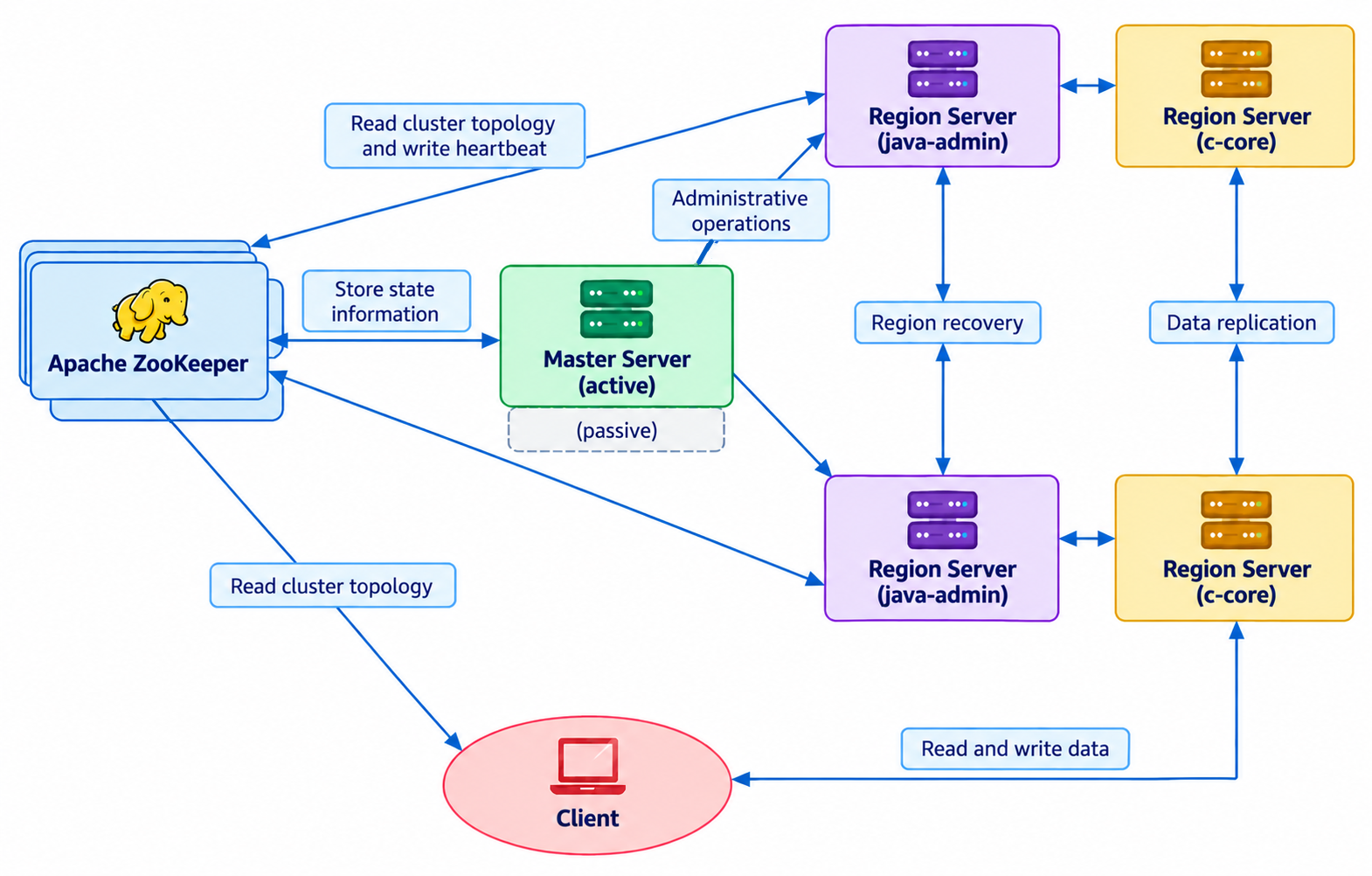
The implementation largely follows the HBase architecture. AtalantaDB uses the following main components for distributed data processing:
· Master Server (active) — the primary node in the cluster, responsible for distributing regions across Region Servers, maintaining their registry, and coordinating administrative operations: creating, enabling, disabling, and deleting tables, moving regions, recovery, and so on.
· Master Server (passive) — a standby node in the cluster that monitors the active master and takes over its role if it fails.
· Region Server (java-admin) — manages regions. A region is a range of records corresponding to a contiguous range of RowKey values within a table. Together, the regions accessible over the network make up the contents of a distributed table. This component handles physical file creation and copies data from replica copies during recovery after a failure.
· Region Server (c-core) — provides direct client access to data. Because this component is performance-critical, it is implemented in C for maximum speed. It also replicates data during writes when the replication factor is greater than 1.
· Apache ZooKeeper — a fault-tolerant service that coordinates AtalantaDB services. ZooKeeper servers provide clients with information about the cluster topology. Clients connect to them and retrieve the list of regions hosted by Region Servers. The service also allows components to exchange information about each other's availability through ephemeral nodes.
In terms of the CAP theorem, AtalantaDB, like HBase, is a CP system (Consistency + Partition tolerance), meaning that it sacrifices availability. During a network partition, AtalantaDB therefore preserves consistency by restricting the availability of operations. Some administrative operations can also temporarily block requests to the affected regions. This can be considered its main drawback: you cannot assume that it will respond at every moment. However, for a service that must sustain a specified level of performance around the clock for years, we would not rely on a single cluster in any case. Replication within a cluster protects against the individual node failures it is designed to handle, but upgrades, configuration errors, and cluster-wide incidents require a separate plan. We therefore consider a standby cluster with tested failover an important part of such an architecture, together with spare capacity, independent backups, and separation of administrative access.
How tables are split into regions
For efficient operation, meaning high performance, it is essential to distribute the load both across Region Servers and across the CPUs and disks within each instance. This is achieved by splitting tables into regions, each of which serves its own key range.
Because AtalantaDB is a key-value store and partitions data by key, it is essential to distribute data evenly across all regions. This is the user's responsibility. For example, partitioning the following table into three parts produces three regions:
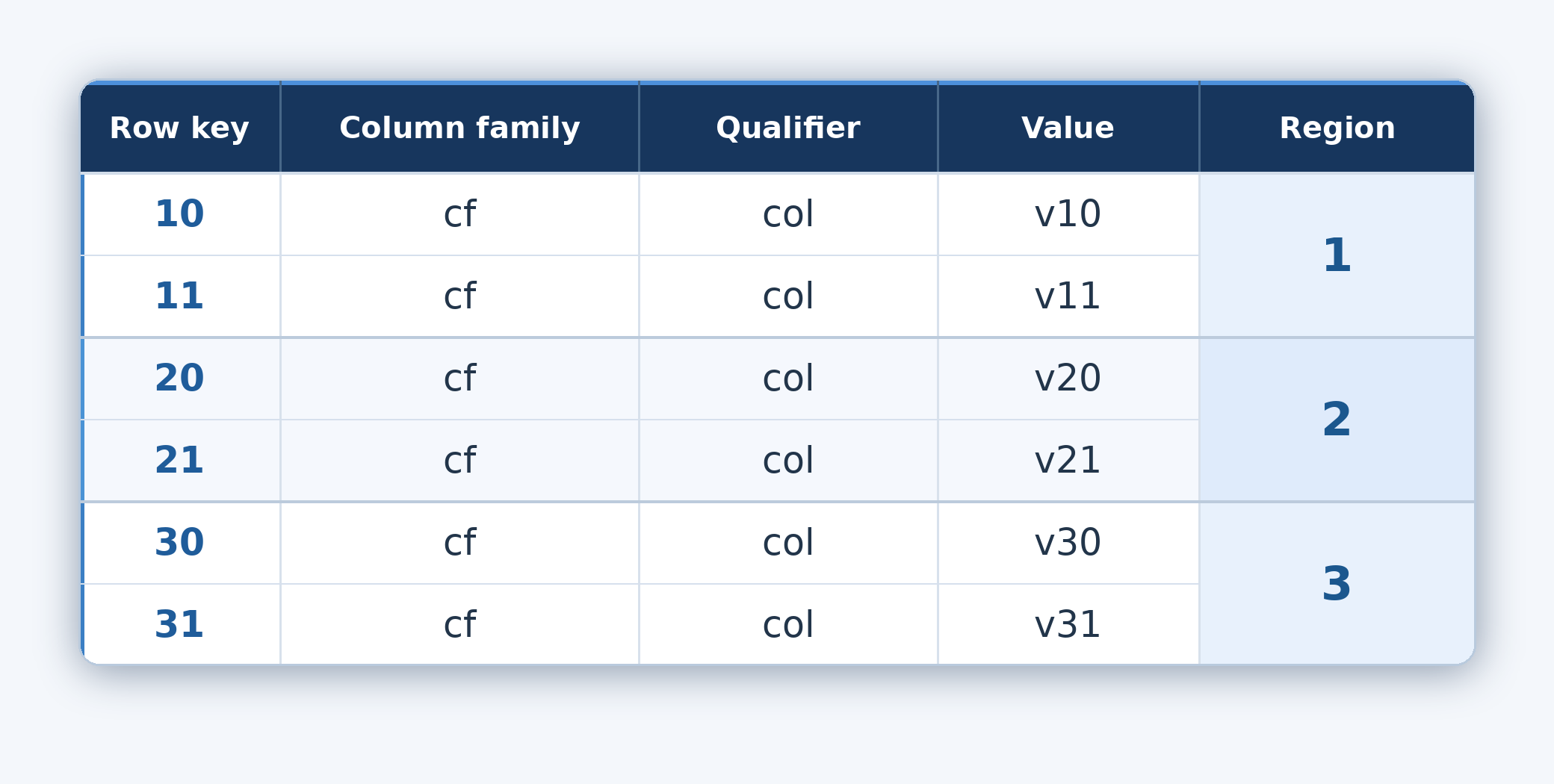
If the keys are decimal numbers encoded as strings, a shared prefix can concentrate the load in a single region. For example:
1000001
1000002
…
1100003
Because keys are stored as byte arrays, all of these keys start with the same byte (1) and therefore belong to region #1, which holds that key range. This increases the load on that region and reduces the database's efficiency. One of the simplest and most effective ways to solve this problem is to concatenate the hash produced by xxHash32(rowkey) with the original rowkey:
xxHash32(rowkey) + rowkey
For lookups, the client computes the same four-byte hash prefix. When recovering the original key from the salted key, it removes the prefix. The data is then distributed reasonably evenly across the regions. On reads, the client simply discards the first four bytes to obtain the original key. We recommend always using this specific implementation, XxHash32KeySalter.saltKey(rowkey), because it will be important for future index optimizations.
Every operation on a region's data executes under a lock. To achieve maximum performance, each host should therefore have dozens of regions, preferably 100 or more. We plan to optimize this in the future by splitting each region into logical ranges that can be processed in parallel. This should substantially improve performance even with a single region per host. For now, however, users need to plan an appropriate division of tables into regions themselves, just as they do with HBase.
Replication works as follows:
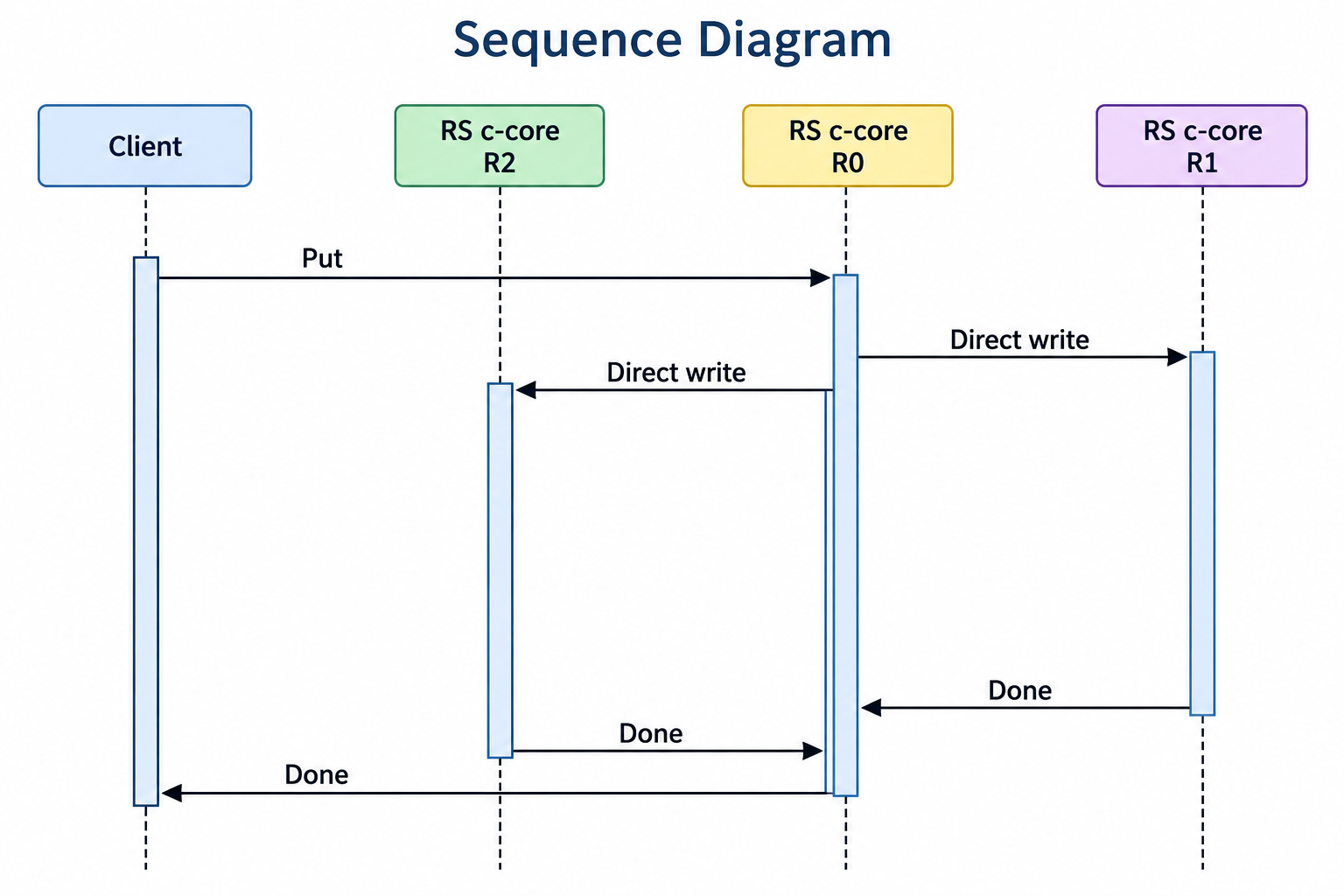
After receiving a successful response, you can therefore be confident that the data is at least in the OS caches of three servers and can be recovered if the leader fails. Recovery mechanisms will be described in detail in a separate article. Replication factors of 2 and 1 are also supported, although with a replication factor of 1, data can obviously be lost easily in the event of a failure.
3. Performance
Aerospike claims to be the fastest, which is consistent with our tests, so we will compare AtalantaDB with it.
Performance comparisons published by Aerospike
These reports use different workloads and configurations; the figures are not results from a single standardized test.
Scroll horizontally to view all columns.
| Report | Workload | Reported throughput difference |
|---|---|---|
| 1. Aerospike vs Cassandra (2016) | YCSB 50/50, 400M × 1 KB, RF=2 | ≈14× |
| 2. Aerospike vs ScyllaDB — Initial Comparison (2016) | YCSB 50/50, 400M × 1 KB | ≈9× |
| 3. Aerospike vs Cassandra Brief (2019) | YCSB balanced R/W, 2.65 TB unique | ≈15.4× |
| 4. Aerospike vs ScyllaDB Brief (2023) | YCSB 50/50, 4 TB | ≈7.2× |
| 5. Aerospike vs MongoDB Atlas (2024) | Player Protection, ~20/80 R/W, up to 10 TB | ≈8.9× |
| 6. Aerospike vs Redis (2025) | YCSB 70/30 and 100/0, 1/5/10 TB | +11%…+25% |
| 7. Aerospike vs DynamoDB / DAX (2025) | 70/30 and 100/0, 1/5/10 TB | ≈26×…118× |
| 8. Aerospike Enterprise vs Cassandra — benchANT (2026) | 50R/40W/6U/4D, ~3.4 TB | ≈3.49× |
| 9. Aerospike vs ScyllaDB — multi-TB (2026) | 70/30, 3 TB | ≈2.42×…16.3× |
We will start with a relatively small dataset on a single server with a replication factor of 1. These are essentially laboratory conditions, useful mainly for comparison and reproducibility: deploying an entire cluster is not always possible, and the network plays an increasingly important role as the deployment scales. Although the database was originally designed for truly large datasets, it handles small ones well too. Such a deployment can even serve as a production cache server, for example, where replication is not mandatory.
Test environment
Database instance servers:
CPU: 80 cpu h/t, 3.1 GHz
NVME: 6TB (xfs) x 4
MEM: 750 GB
Load generators — 10 hosts:
CPU: 80 cpu h/t, 2.3 GHzAerospike MSA §7.4(e) prohibits using its services for benchmarking and competitive analysis, so we do not present direct EE measurements here. 7.4(e) "Customer will not … directly or indirectly: … (e) use any Services to perform competitive analysis, for benchmarking purposes, for the benefit of a third party ..."
Community version 8.2.0, current at the time of testing, allows data to be loaded into only two namespaces, with a combined capacity of 1,280 GB (640 GB per namespace). We therefore used the following configuration:
namespace ycsb1 {
    replication-factor 1
        partition-tree-sprigs 1M
        stop-writes-sys-memory-pct 98
        default-ttl 0d
        nsup-period 0

    storage-engine device {
        file /data1/ADB/aerospike/data/ycsb1.dat
        file /data2/ADB/aerospike/data/ycsb1.dat
        file /data3/ADB/aerospike/data/ycsb1.dat
        file /data4/ADB/aerospike/data/ycsb1.dat
        filesize 160G
        stop-writes-used-pct 98
        flush-size 128K
        defrag-sleep 0
    }
}
namespace ycsb2 {
replication-factor 1
partition-tree-sprigs 1M
stop-writes-sys-memory-pct 98
default-ttl 0d
nsup-period 0
storage-engine device {
file /data1/ADB/aerospike/data/ycsb2.dat
file /data2/ADB/aerospike/data/ycsb2.dat
file /data3/ADB/aerospike/data/ycsb2.dat
file /data4/ADB/aerospike/data/ycsb2.dat
filesize fnb
stop-writes-used-pct 98
flush-size 128K
defrag-sleep 0
}
}Counterintuitively, this does not mean you can insert exactly that much data and then continue operating without concern. When updating data, Aerospike appends the modified data to free blocks rather than immediately overwriting it, and recommends reserving 50% of disk space for updates. This makes sense: it enables high throughput and reduces wear on disks that would otherwise be subjected to constant rewrites. To ensure that compaction, called defragmentation in Aerospike, is active, we run two update passes and count only the second one, because defragmentation does not start immediately.
The first test is therefore designed as follows:
1. INSERT — initially load 500 million records from each of the 10 load generators (LGs). Value sizes are selected randomly between 50 and 150 bytes, averaging 100 bytes. In theory, this should total 500 GB, but in practice it occupies about 700 GB, which is close to the recommended 640 GB (1280 / 2). Each LG writes to its own table, with 100 regions per table. This is important for AtalantaDB because it enables efficient parallel processing of data.
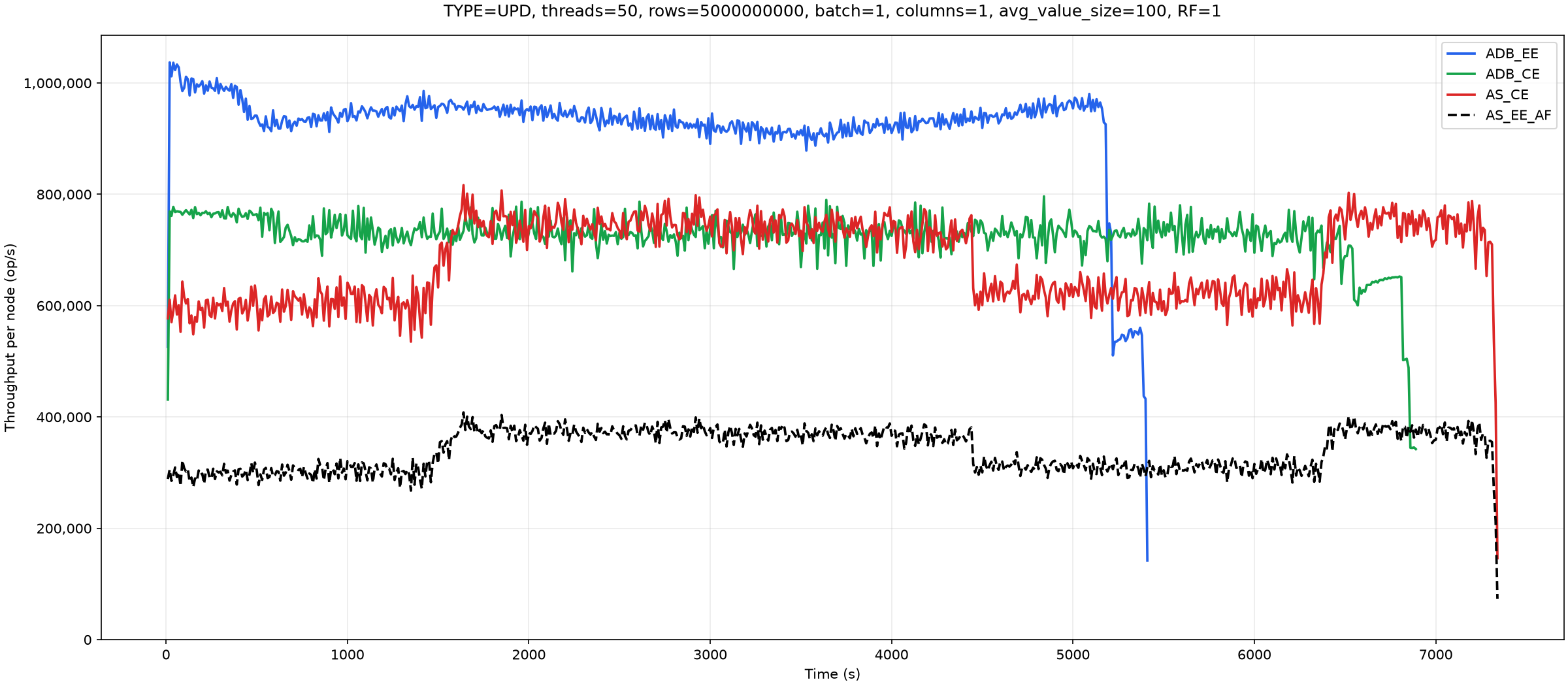
2. UPDATE — update 5 billion records with random values of 50 to 150 bytes and collect statistics from the second pass.
3. GET — perform the specified number of reads: 500 million from each of the 10 hosts.
Here is an example of the resulting salted key in hexadecimal:
atalanta-client#atalanta-shell> get 'ycsb1:t1', "\x35\xF7\xB0\xA0\x75\x73\x65\x72\x37\x34\x36\x31\x32\x32\x33\x34\x39\x36\x36\x30\x35\x30\x34\x39\x38\x39\x39\x5F\x32\x36\x36"
  cf:field0                               timestamp=2026-10-05 T05:40:38.706, value=$::1X+2<"9Zg7680^o=Gs?Es*(h+T71/v3\}&Lm7(4#X3(<d0.t71 1_c7J{&',-$ 5"|3,h%/.1,>>T=8#*":f6I+.7n>380=`*.(4\%02~:X{&7b1Hy"(Z9
The same record can be retrieved using the shell's built-in key salting mechanism:
atalanta-client#atalanta-shell> get_salt 'ycsb1:t1', 'user7461223496605049899_266'
COLUMN                                   CELL
  cf:field0                               timestamp=2026-10-05 T05:40:38.706, value=$::1X+2<"9Zg7680^o=Gs?Es*(h+T71/v3\}&Lm7(4#X3(<d0.t71 1_c7J{&',-$ 5"|3,h%/.1,>>T=8#*":f6I+.7n>380=`*.(4\%02~:X{&7b1Hy"(Z9
The client computes the same prefix for the lookup. Discarding the first four bytes therefore refers to recovering the original key from the returned salted key.
Each LG host runs operations in 50 threads. The reason is that increasing this setting causes some tests to produce errors such as:
Error while writing key user9099479094599912111: com.aerospike.client.AerospikeException: Error 18,1,0,30000,60000,0,A111222233334401 10.10.10.1 3000: Device overload
Error while writing key user8954279246148510761: com.aerospike.client.AerospikeException$Backoff: Error -12,1,0,30000,60000,0,A111222233334401 10.10.10.1 3000: Max error rate exceeded
We therefore reduced the number of threads until the failures stopped. The tests use YCSB. The source code used for these measurements is available at https://github.com/atalantadb/YCSB
Here are the initial loading results:
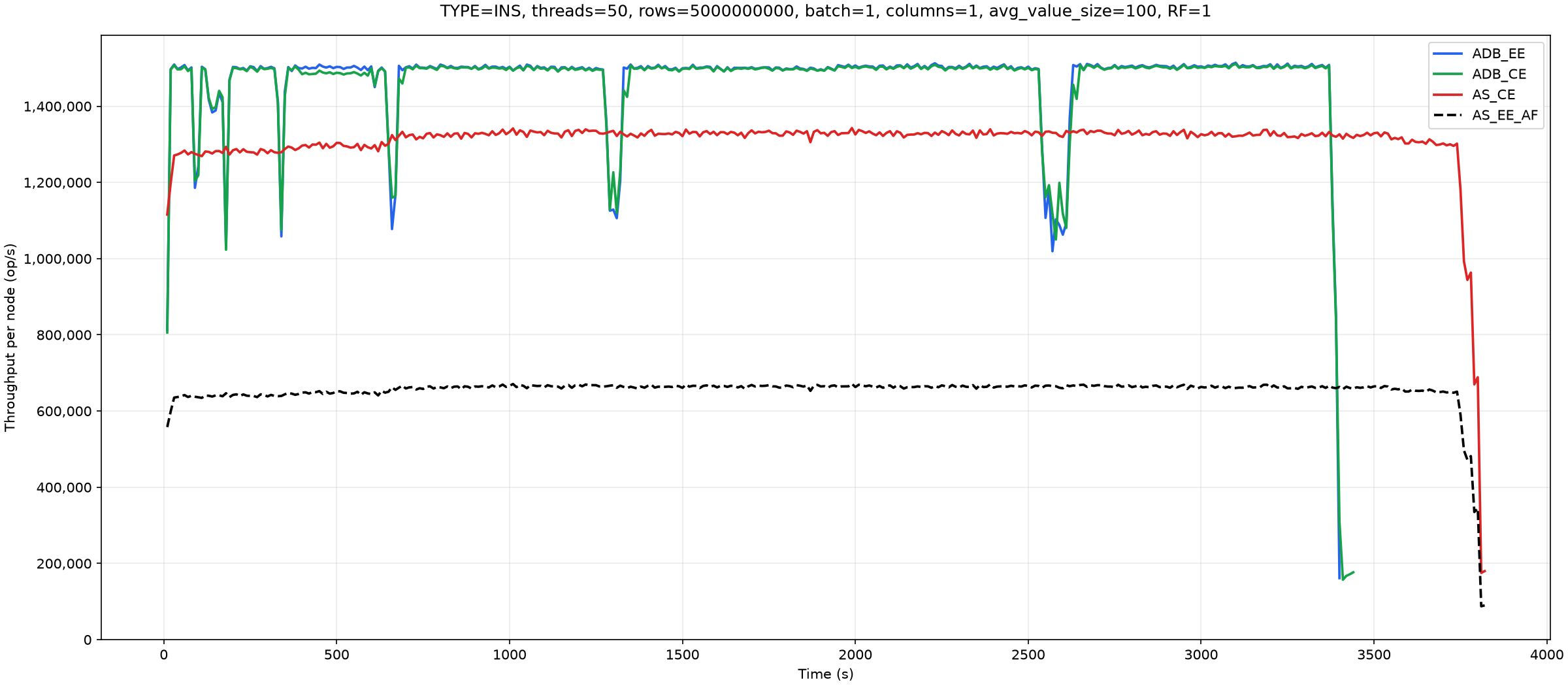
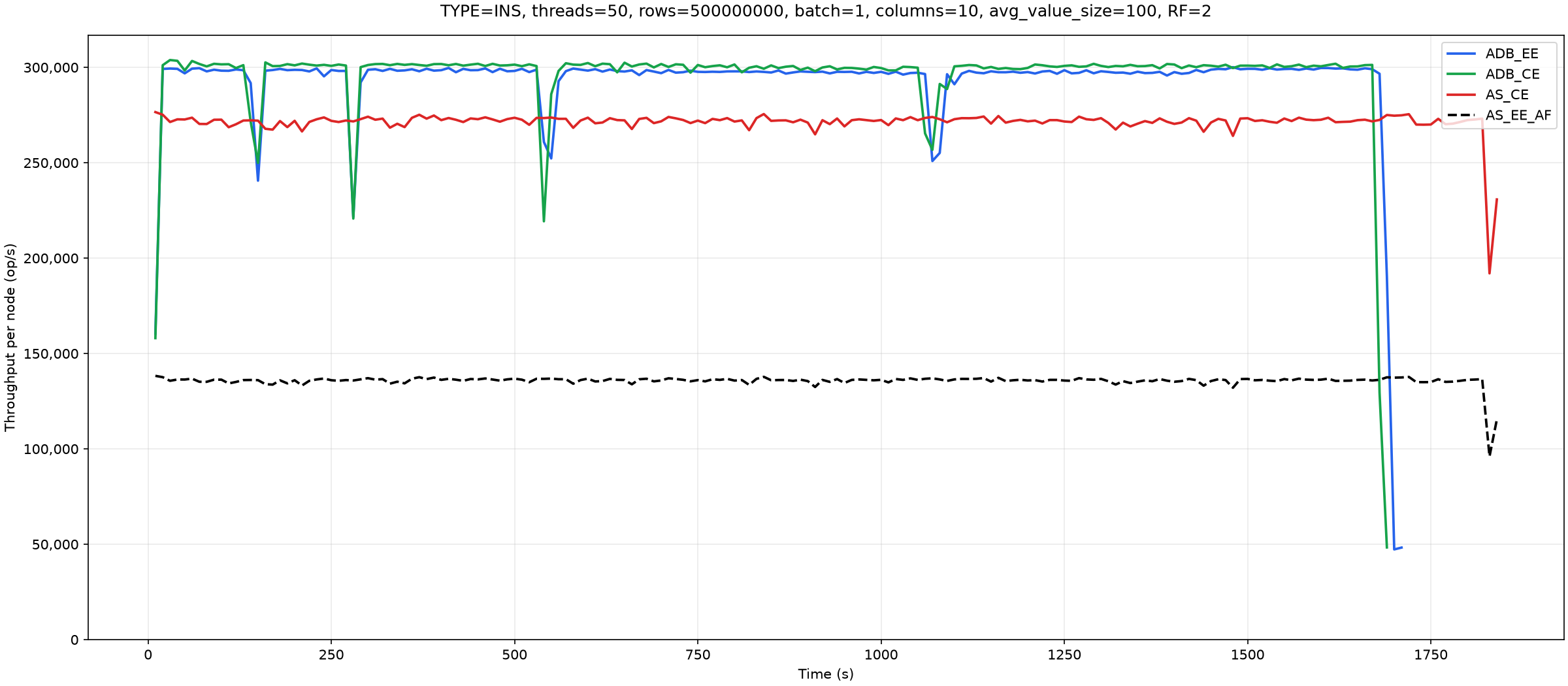
The temporary throughput drops in AtalantaDB correspond to index resizes. They become less frequent as the test progresses. If the approximate number of keys to be loaded is known in advance, it can be specified when the table is created, avoiding intermediate index resizes. We now need to explain AS_EE_AF. Since Aerospike prohibits publishing EE benchmarks, we use its own reports, which test very similar workloads on different hardware. Conveniently, both use a replication factor of 2 and a record size of approximately 2 KB. The hardware differs, but if we assume that performance scales roughly in proportion to the hardware characteristics, the comparison looks as follows:
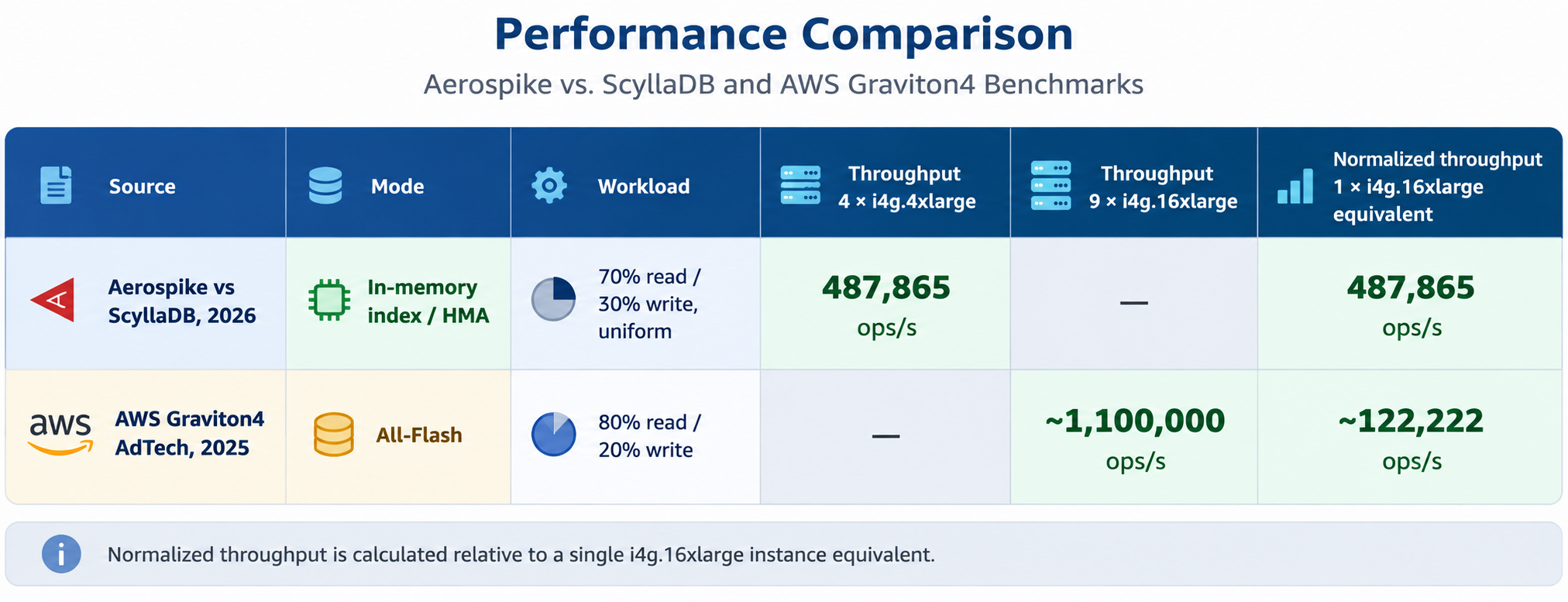
Although the calculated slowdown is as much as fourfold, we take a much more conservative approach and divide the CE throughput results by only two. In other words, AS_EE_AF models Aerospike performance in ALL-FLASH mode. This illustrates the selected coefficient; it is not a measurement or a validated estimate of Aerospike EE All-Flash performance.
Next are the results of the second update pass:
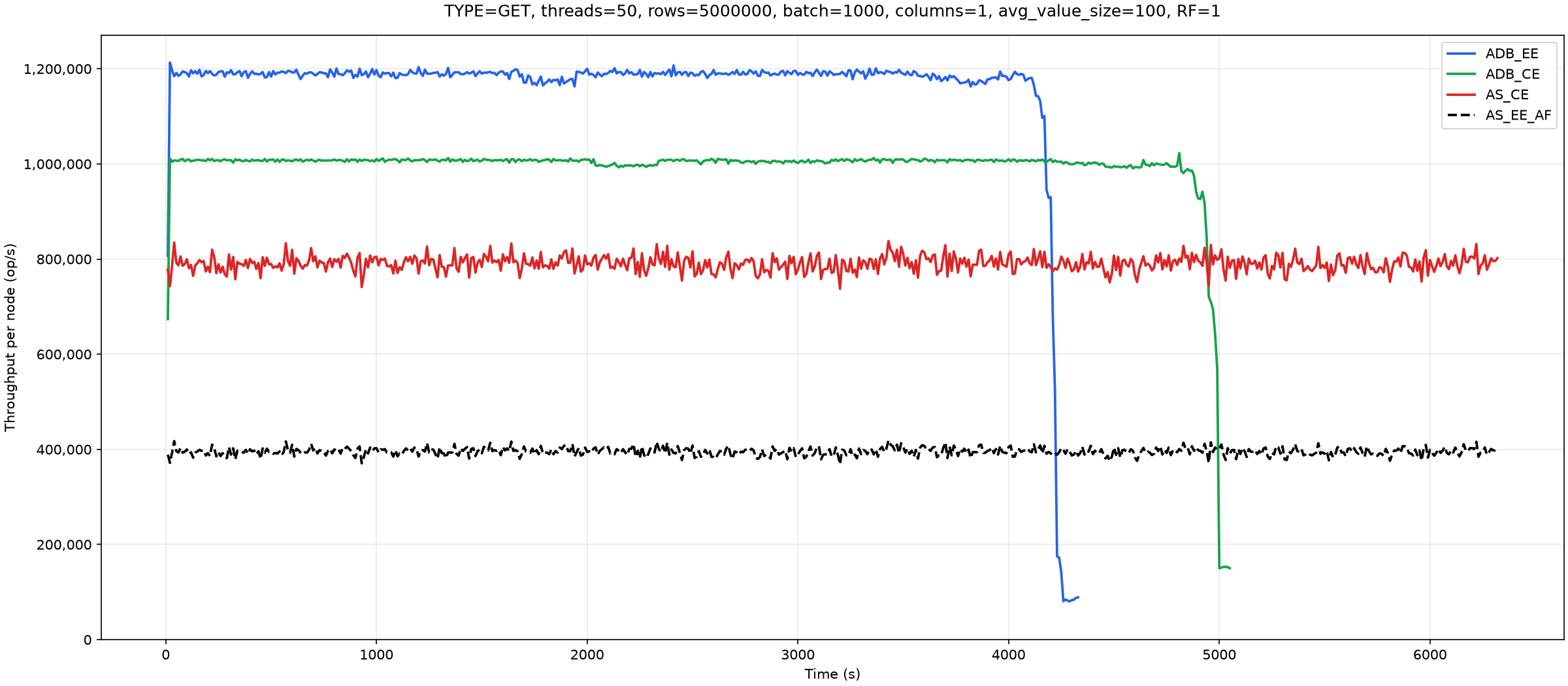
The third test measures reads:
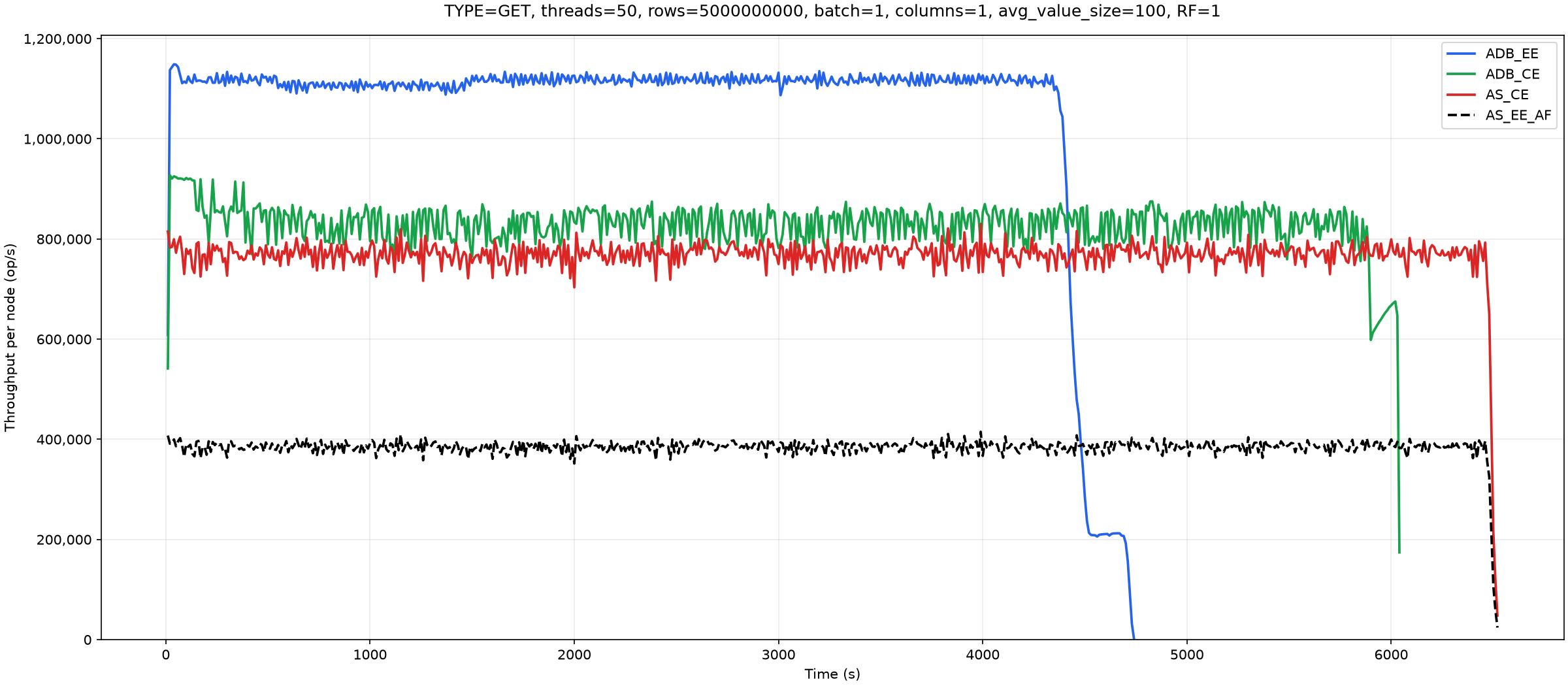
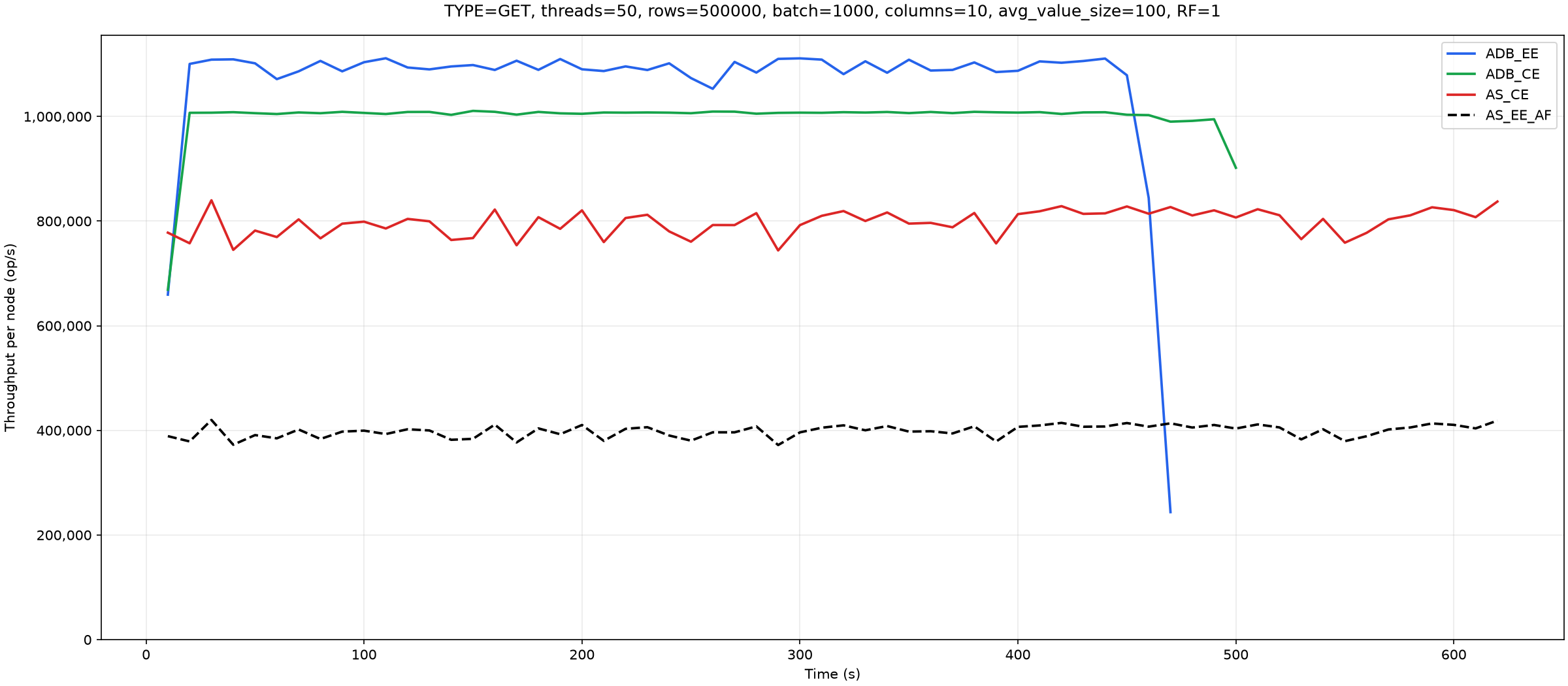
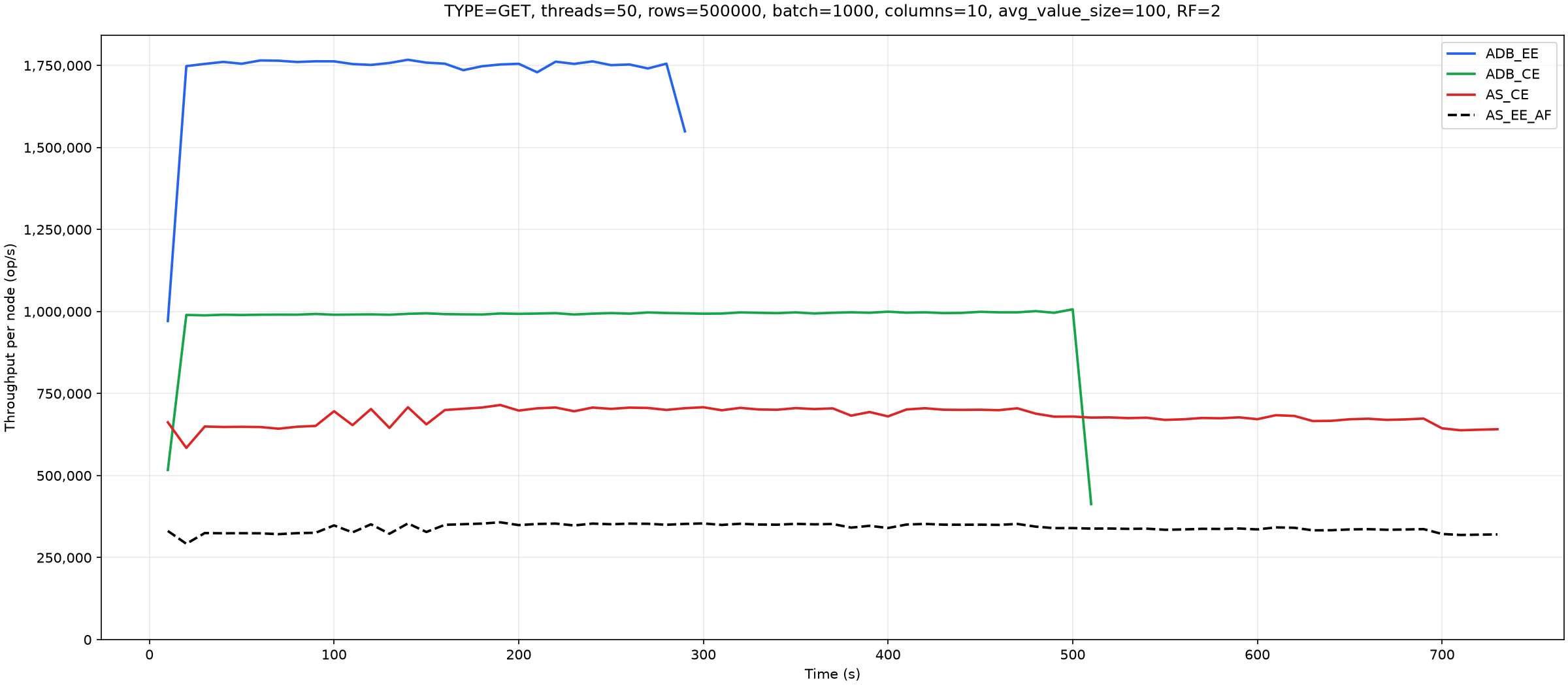
EE's high throughput here is explained by Read Cache, which uses spare memory to cache data. When memory requirements grow elsewhere, for example for indexes, the caches are automatically cleared and the memory becomes available for reuse.
Next, we increased the number of columns from 1 to 10, with each column still containing a random value of 50 to 150 bytes, and reduced the record count tenfold to stay within the Aerospike CE capacity limit.
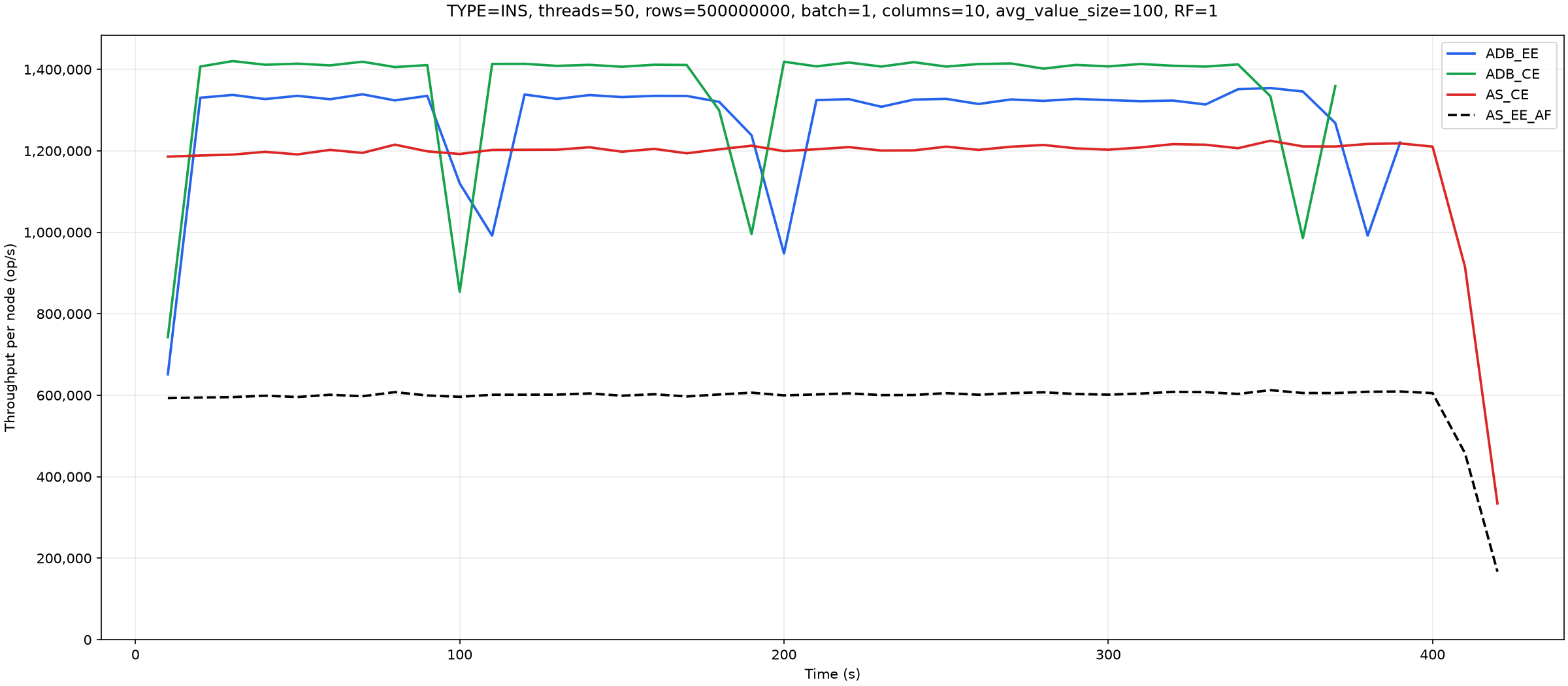
Updates:
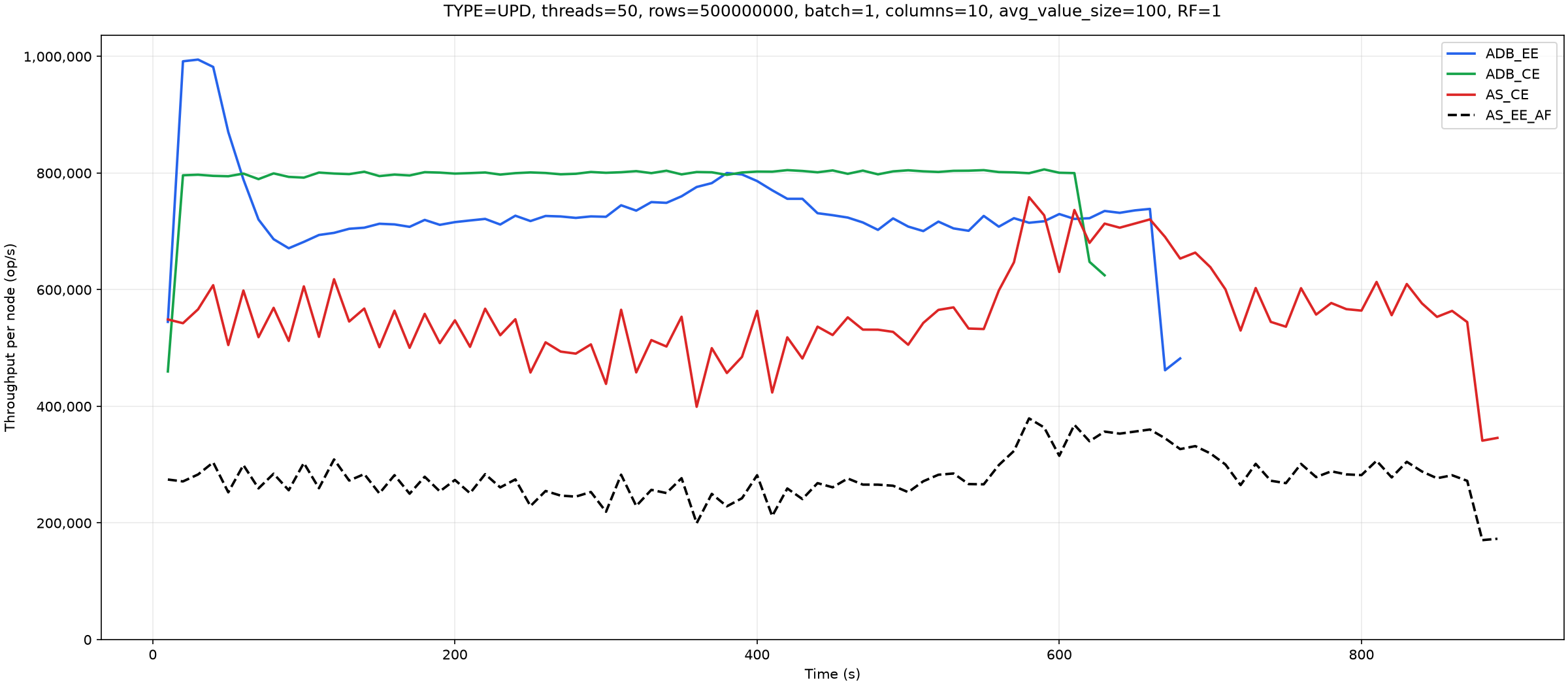
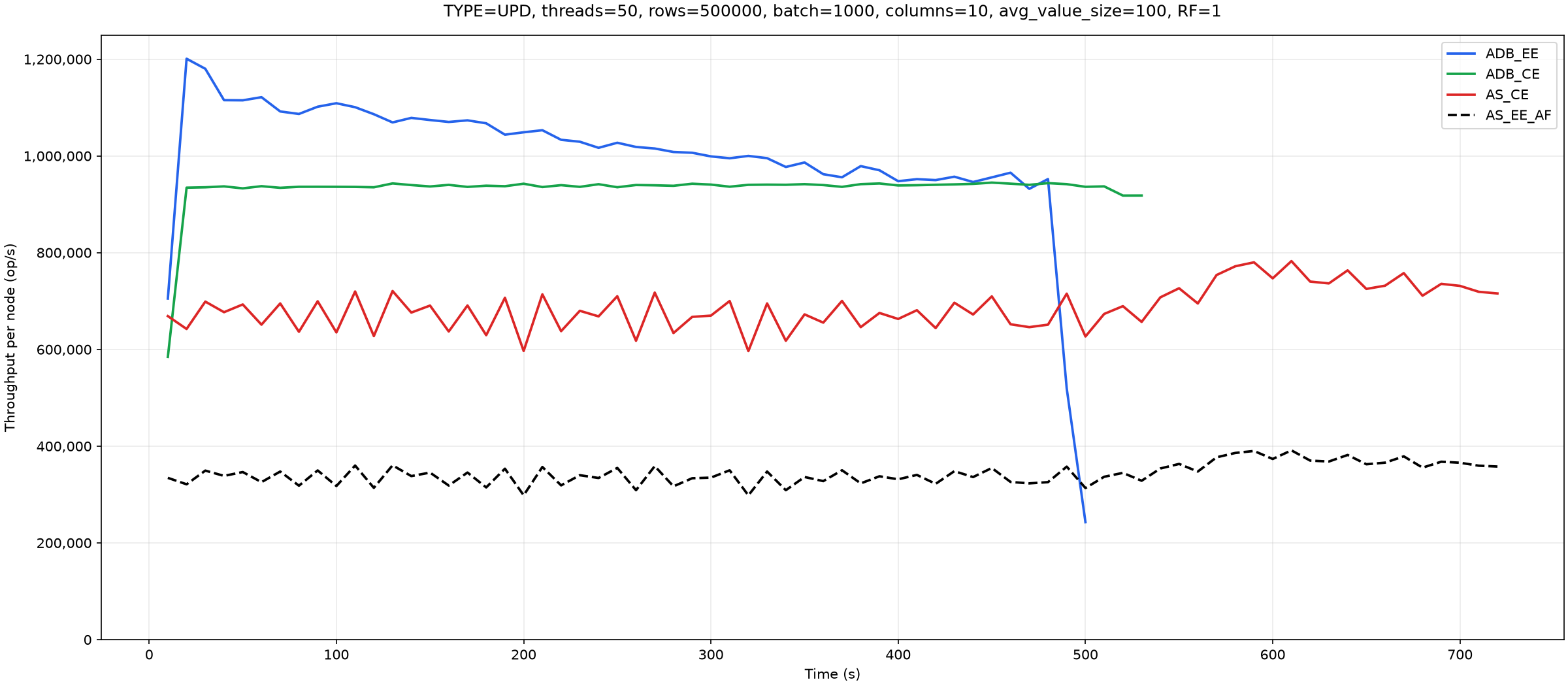
The difference in behavior between AtalantaDB EE and AtalantaDB CE needs an explanation here. It comes from append update mode, which is enabled by default in EE. In this mode, updating a record does not immediately overwrite it with the final version. Instead, the existing record is read, merged with the new version supplied by the client, and the result is appended to the file. The old copy remains on disk as obsolete data.
AtalantaDB CE, by contrast, immediately overwrites the old version with the new one. Append update not only improves throughput; an equally important reason to use it is reduced SSD wear. All else being equal, immediate overwrites exhaust SSD endurance more quickly. With append update, modified data is appended to the file until the proportion of obsolete data reaches 50%, after which the blocks are compacted. This allows several blocks with a high proportion of obsolete data to be rewritten in a single pass, benefiting disk longevity. The beginning of the chart shows updates while compaction is unnecessary because there is room to append data. Throughput then drops when compaction starts. However, this mode also has a drawback: the larger data volume takes additional time to load during startup index initialization.
Next are the read results for the data that has just been updated:
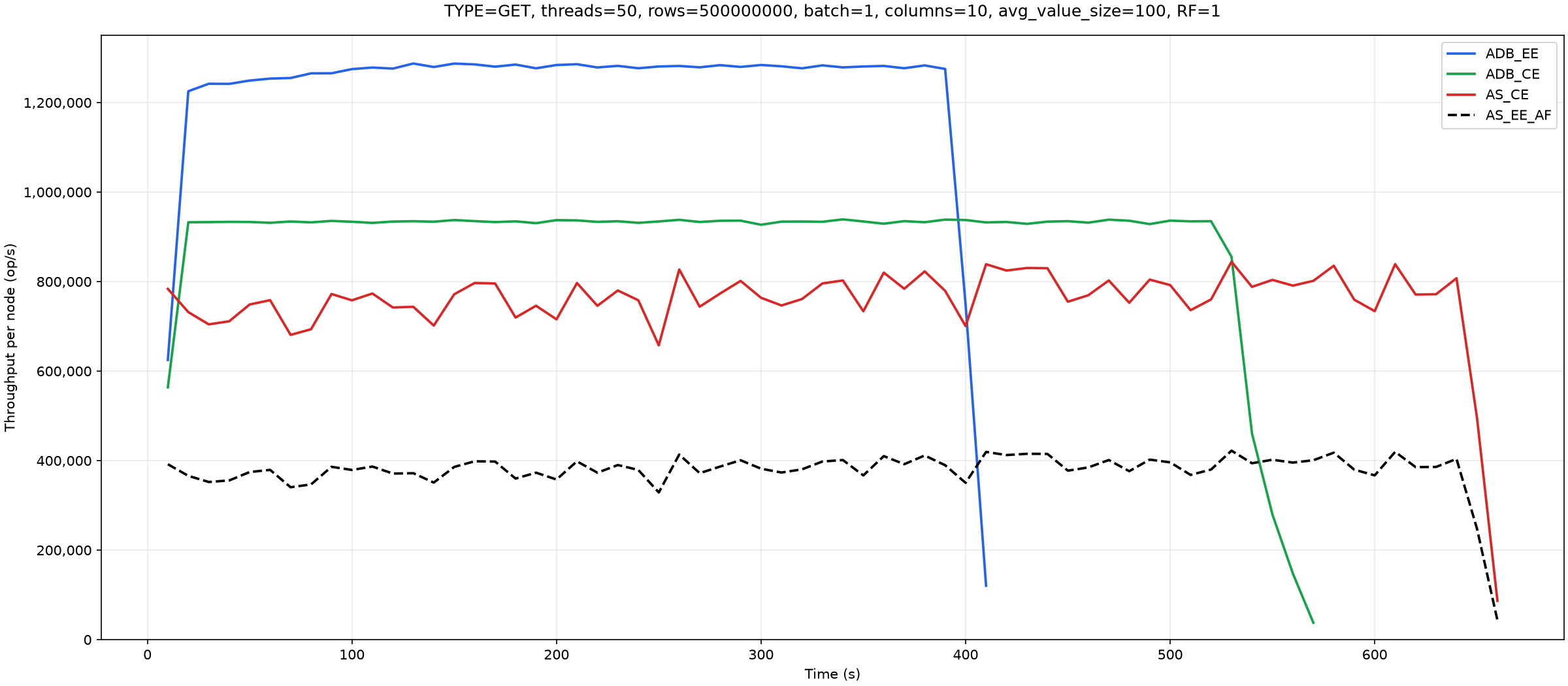
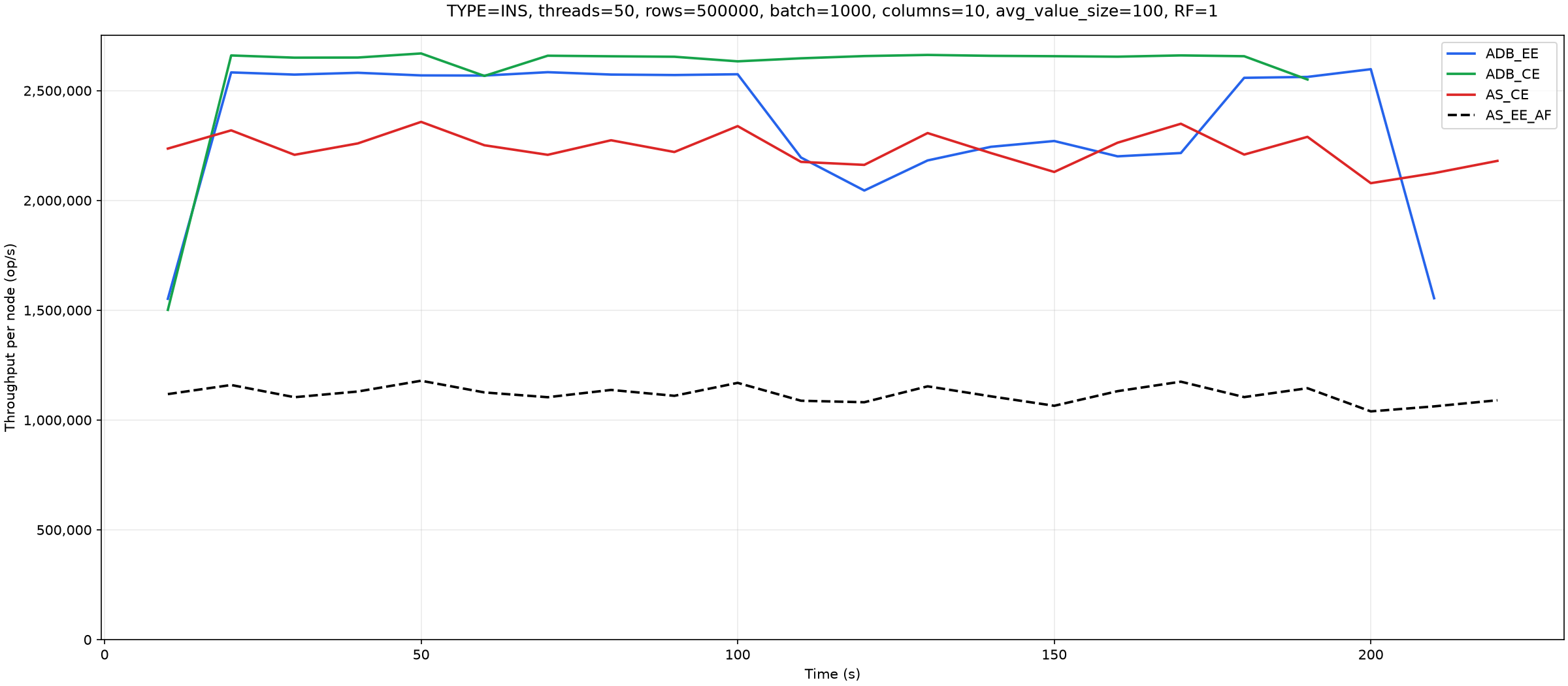
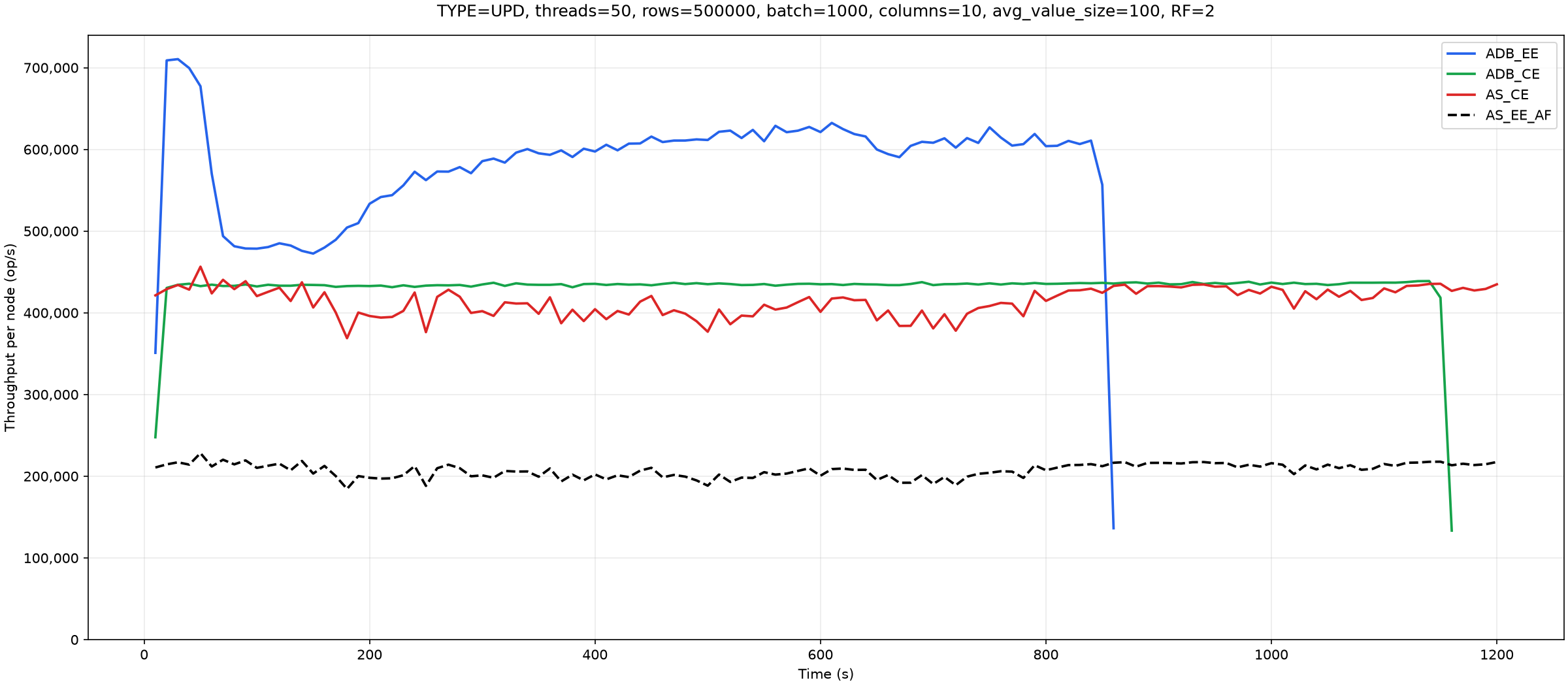
We now repeat the tests above in batch mode. We begin with the same basic conditions as the first test, but each generator now performs 500,000 batch operations of 1,000 records each: 500 million records per generator. The total record count therefore remains the same.
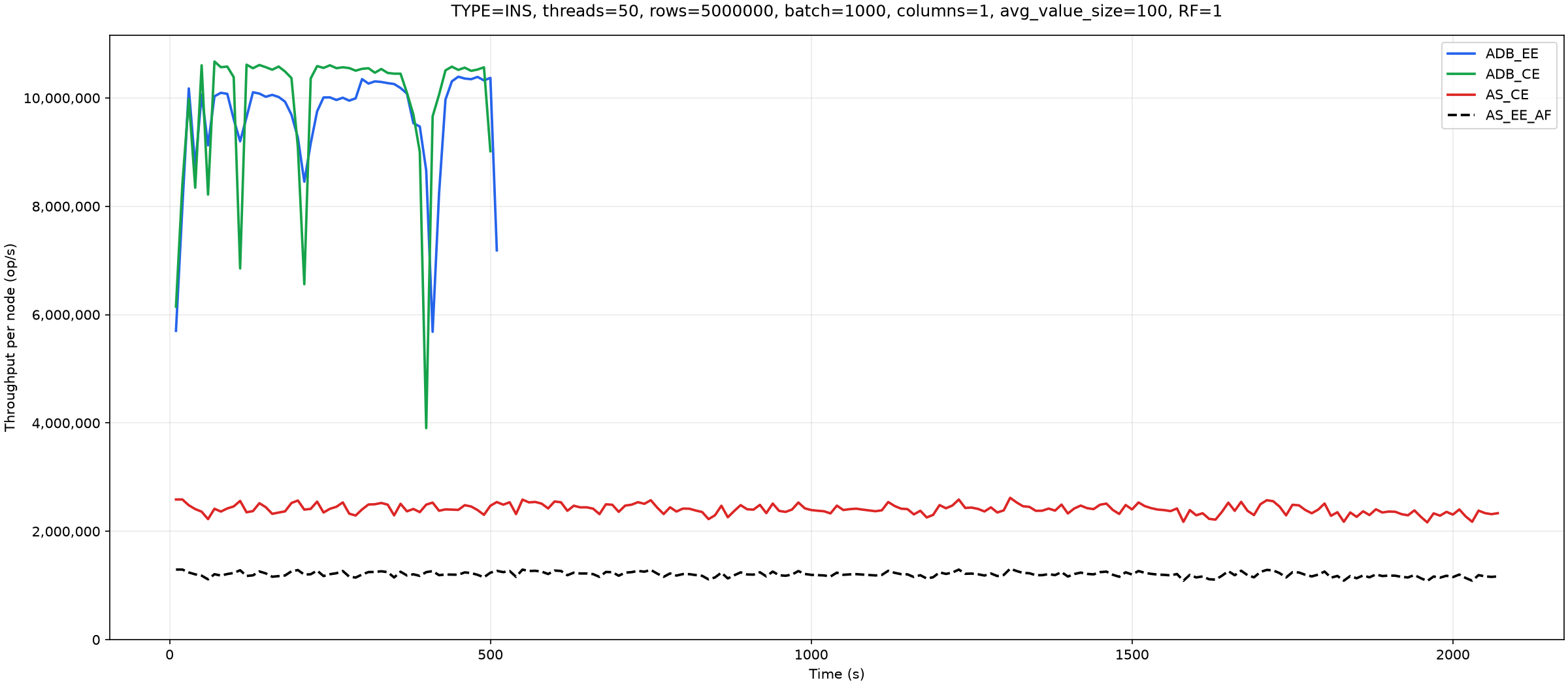
AtalantaDB benefits particularly from combining many individual operations into a single request.
Updates:
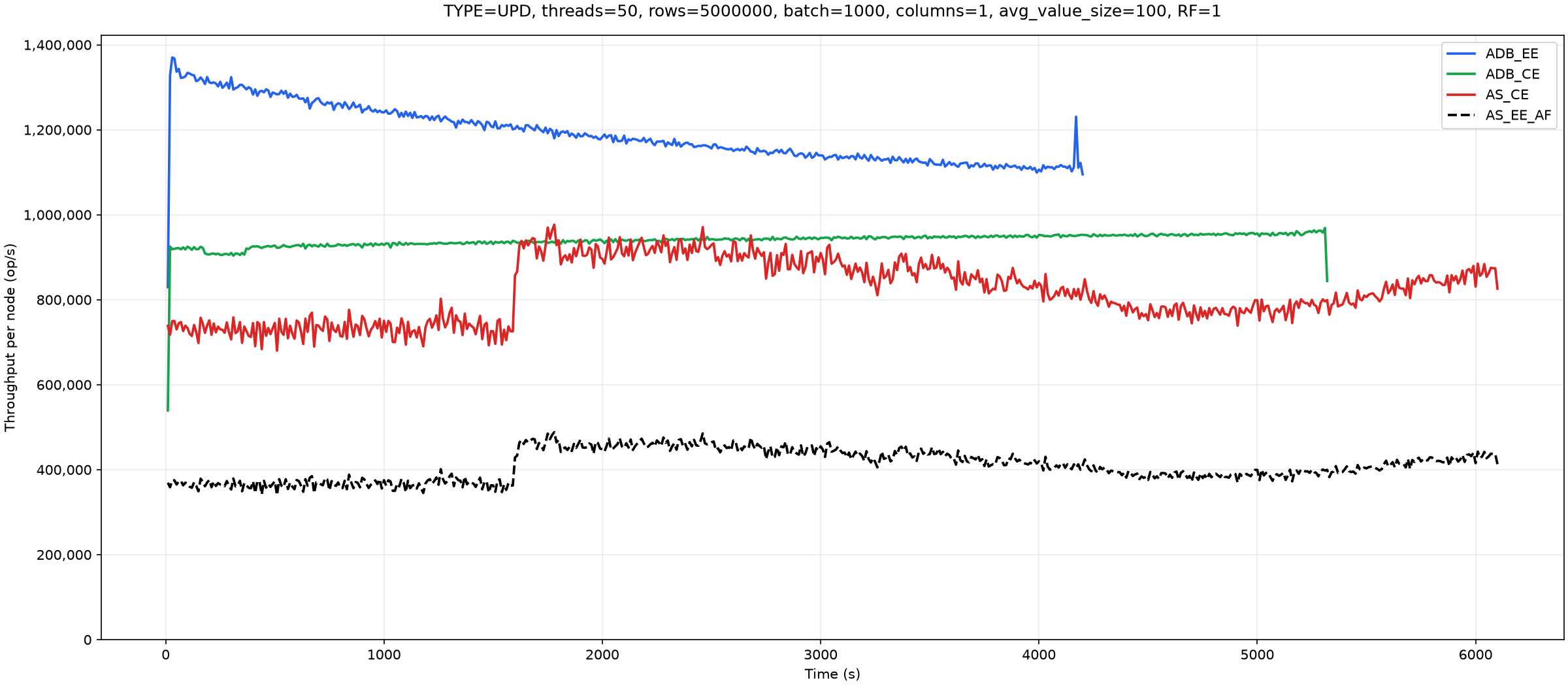
Then we increase the number of columns to 10 and reduce the number of batch operations per generator to 50,000. With a batch size of 1,000, this corresponds to 50 million records per generator.
Updates:
Reads:
Now we move to more realistic tests: three instances with a replication factor of 2. We first compare with Cassandra. There is little point in testing it for long: if it does not deliver high throughput with a small dataset, performance will be worse with a larger one once compaction starts.
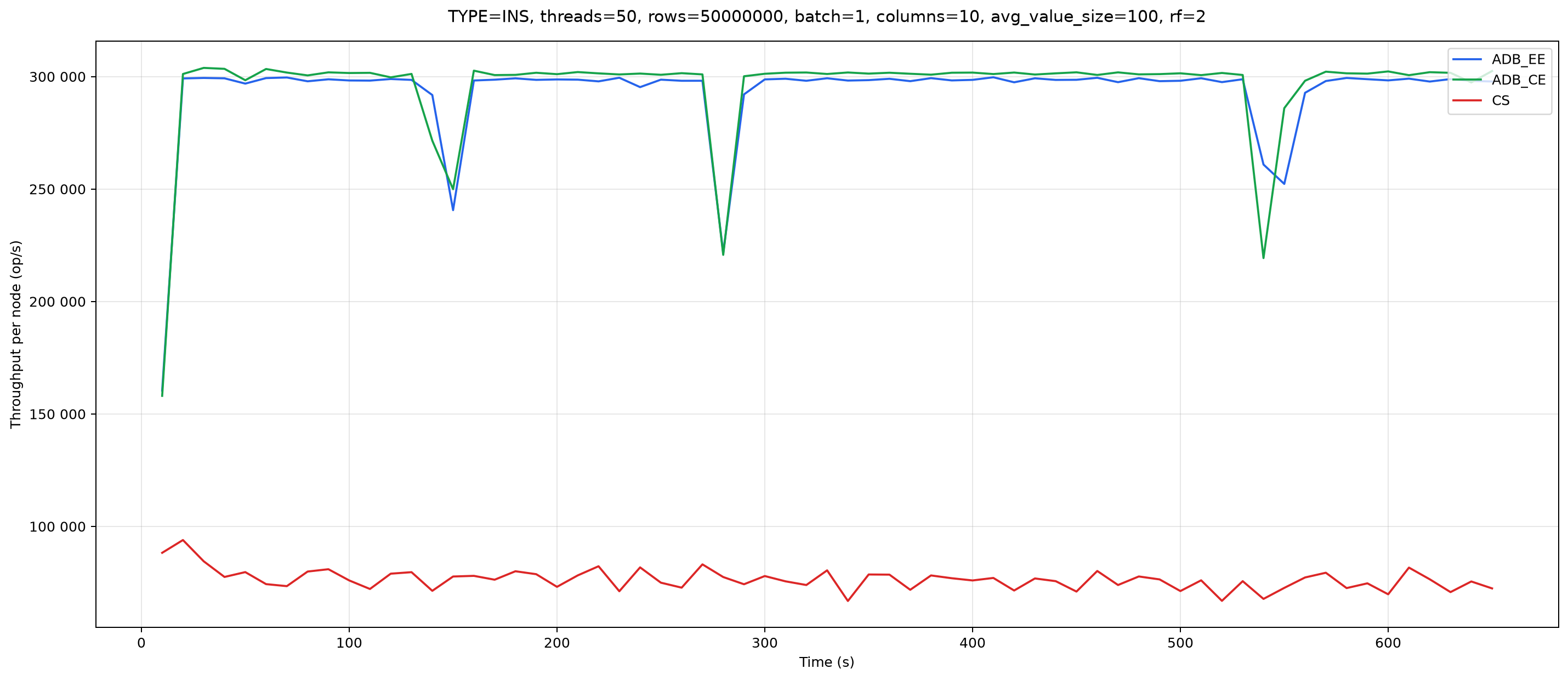
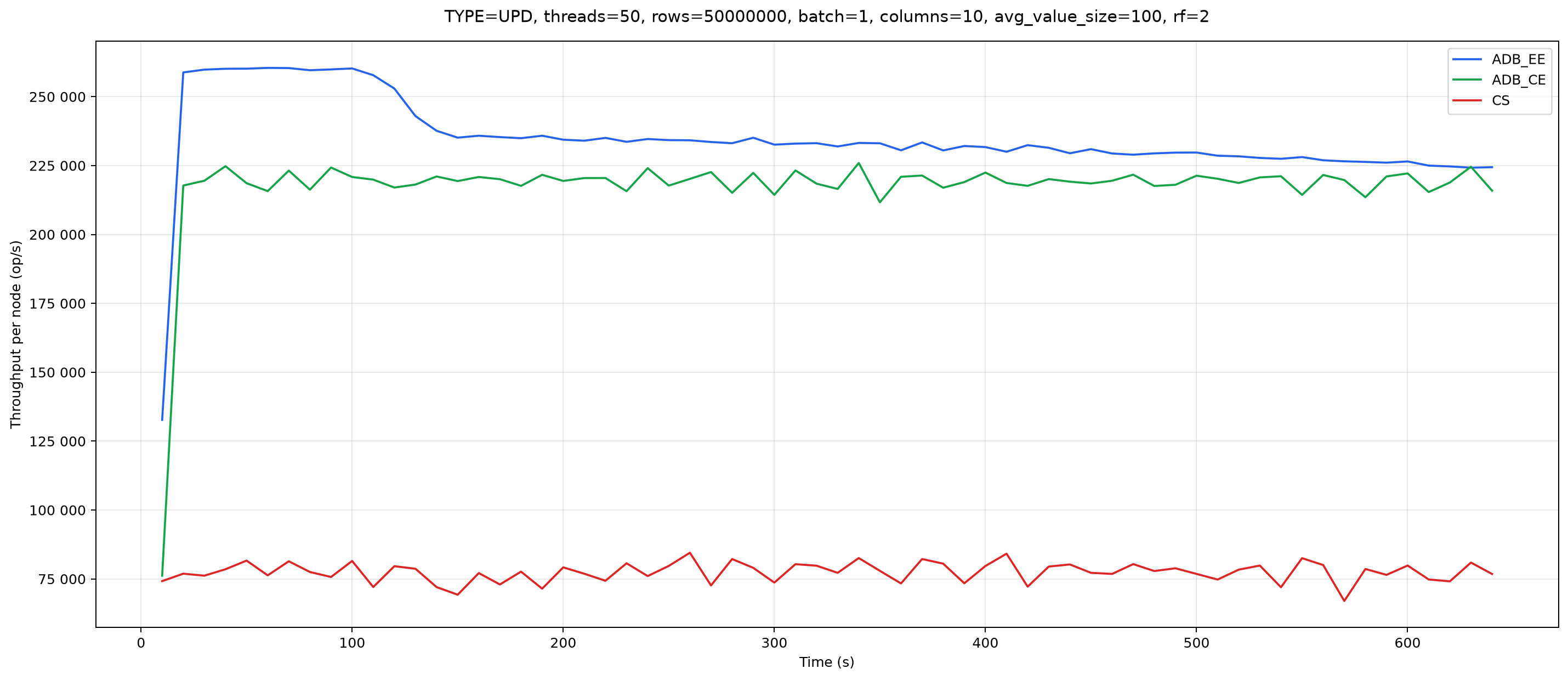
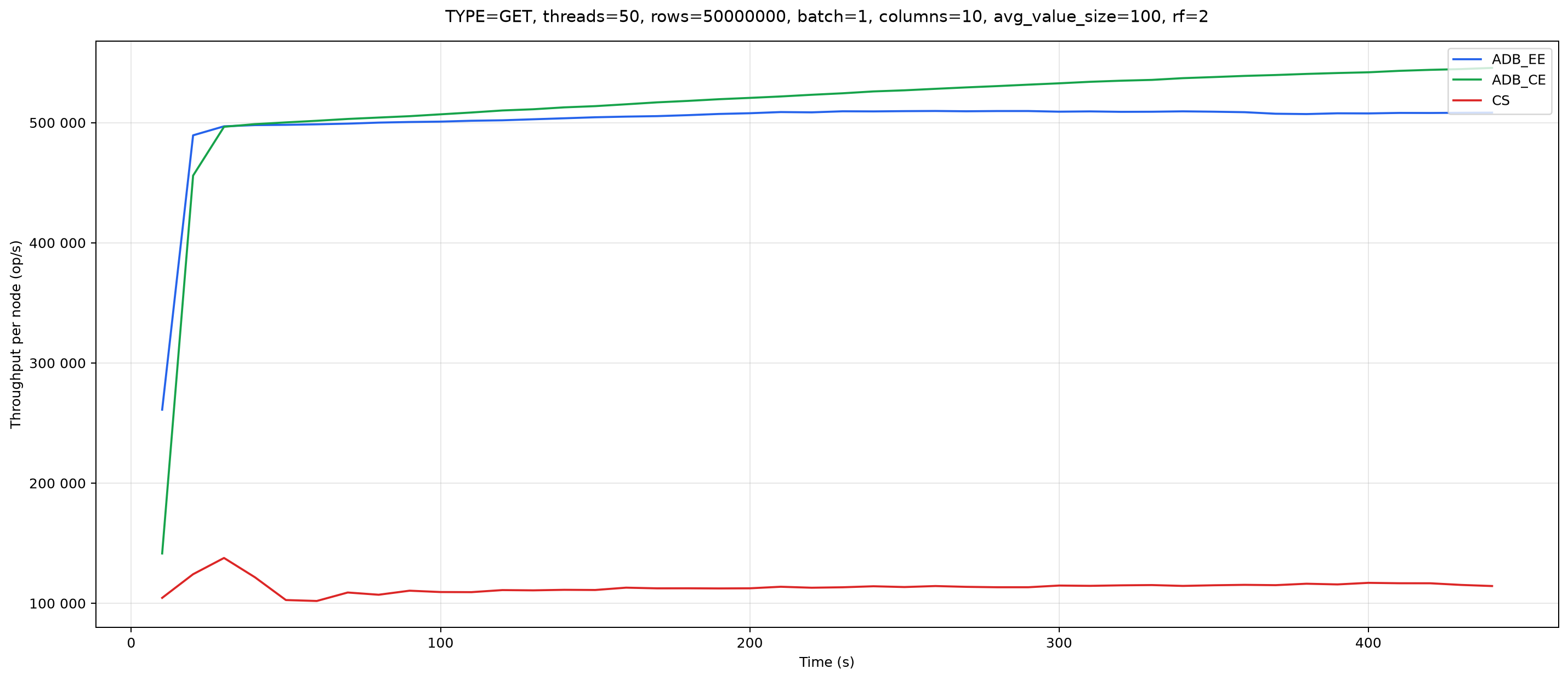
The difference is therefore threefold to fivefold, averaging fourfold.
Now for a particularly interesting competitor: Aerospike. We start with inserts:
Next are the results of the second update pass:
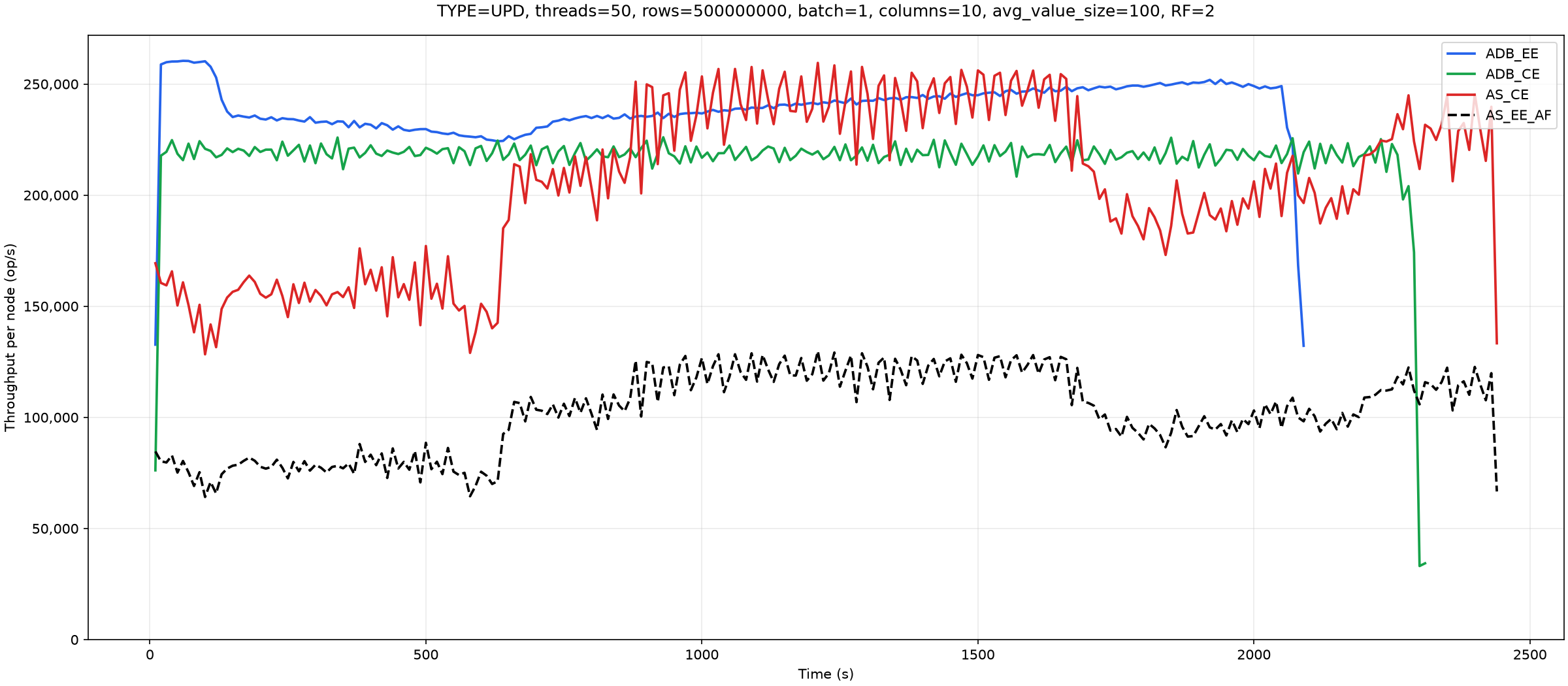
The decreases and subsequent increases in Aerospike throughput are caused by defragmentation starting and stopping.
Now reads:
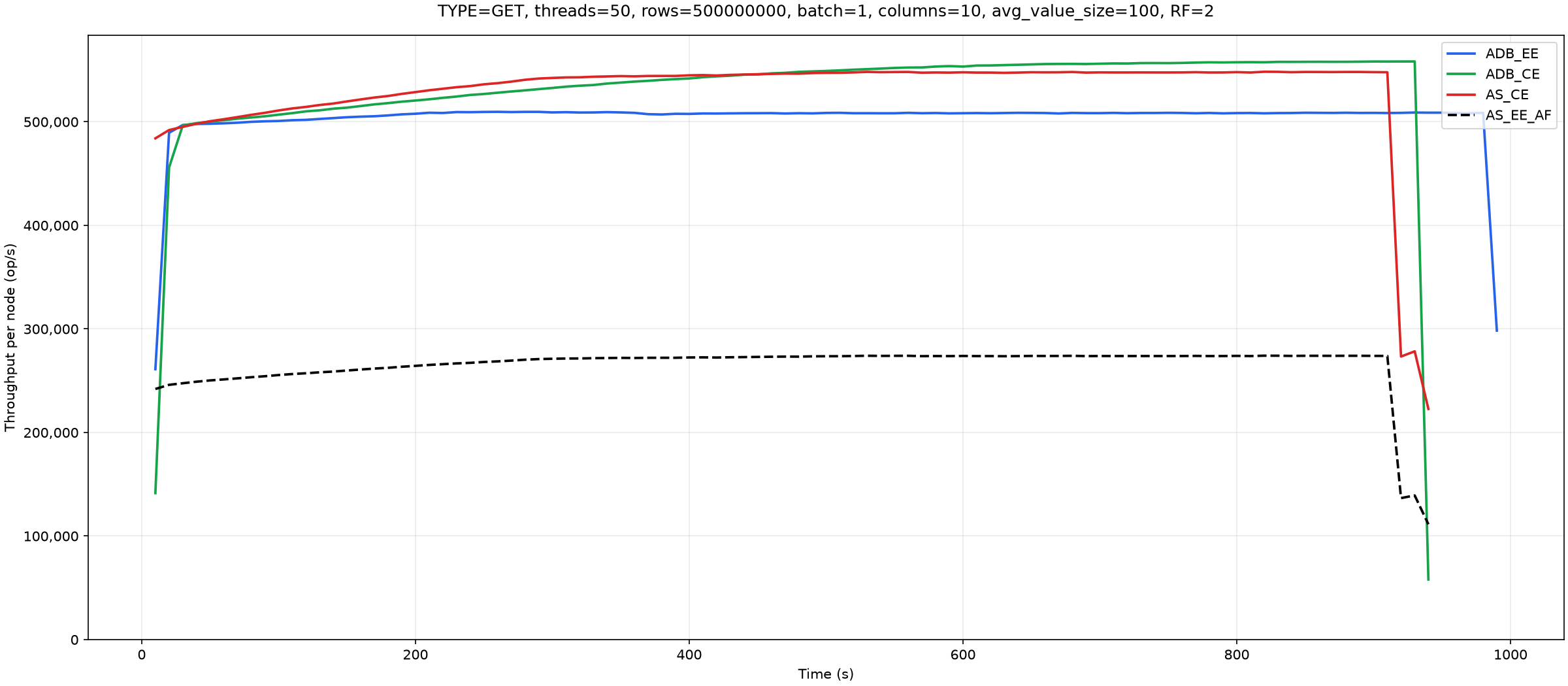
Atalanta CE's higher throughput compared with Atalanta EE is due to append update producing larger files, which makes caching less effective.
Now the batch workloads, starting with inserts in the chart below:

Updates:
Reads:
The corresponding latency measurements:
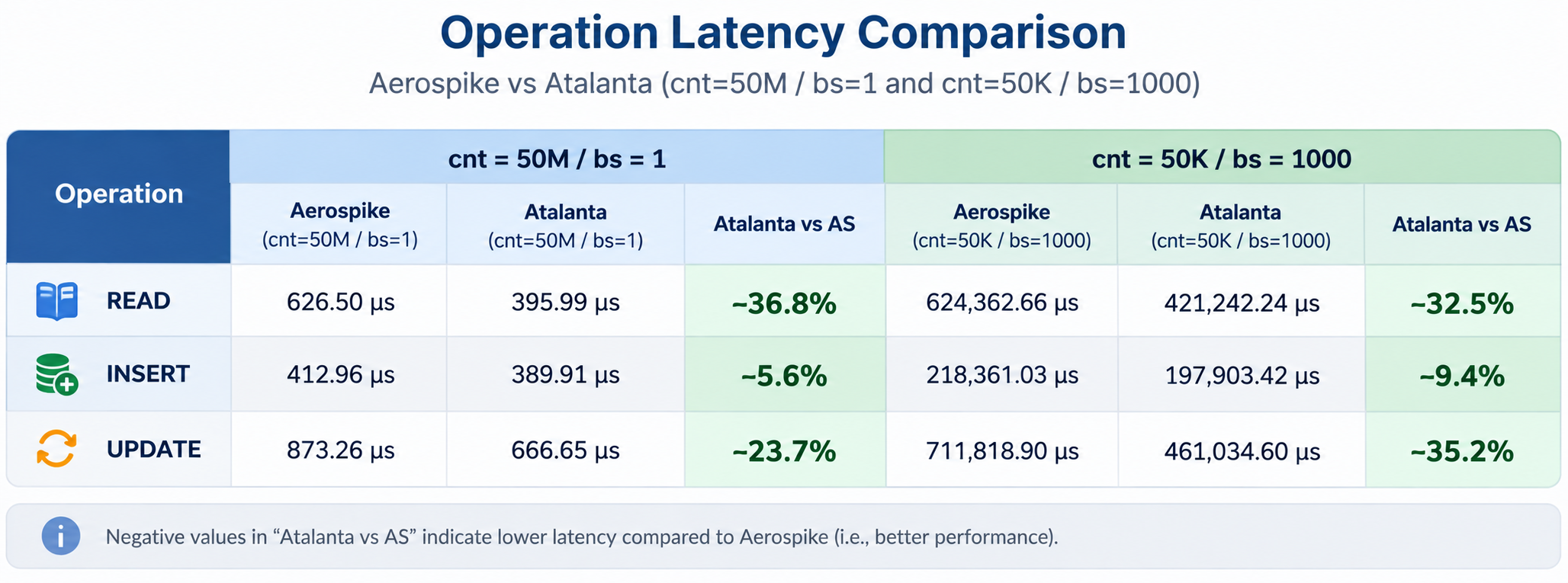
Thus, AtalantaDB delivered higher performance in the tests presented here. We do not claim that there are no scenarios in which it is slower; that would of course be unrealistic. In particular, these tests used a sufficient number of regions. Under these specific conditions, however, it is the fastest. The original YCSB execution logs and operations-per-second metrics from one AtalantaDB instance are available at https://atalantadb.com/benchmarks/nt1/logs.zip.
4. Installation and operation
AtalantaDB has been successfully deployed on more than 100 powerful servers and processes approximately 2 PB of data. Nevertheless, you can download and install it even on a very modest PC.
To build and start it, simply run build-adb.sh. The database does not require sudo. Building the core may require a few libraries, but if you do not have the necessary permissions, prebuilt binaries are available in adb-core/bin. This starts a mini-cluster of four RegionServers in the AtalantaDB directory. There you will find a Web UI useful for administration, a shell, and a data usage example that can be run with run-usage-example.sh. The deployed mini-cluster and basic operations are described in atalanta-cluster-setup.md. In practice, the database has only been built and run on Ubuntu 24 and Red Hat 8, so other operating systems may present surprises.
This is a fully usable setup, but production use requires an estimate of RAM consumption.
Memory consumption consists of indexes, region working buffers, Read Cache, and general process overhead. For preliminary sizing, it is useful to estimate indexes and region buffers separately.
The main index arrays use 11 to 12 bytes per allocated slot. The larger the index, the less auxiliary information needs to be stored separately, so the memory cost per slot decreases.
Memory is allocated for the index capacity, including unused slots. The cost per key actually stored therefore depends on occupancy:
Bytes per key = bytes per slot / occupancy ratio
For example, at 12 bytes per slot and 70% occupancy, the cost is approximately 17.1 bytes per key. For a rough preliminary estimate, you can use 18 bytes per key, but this is not an upper bound.
The index grows in steps, usually by doubling its capacity. It expands automatically at approximately 93% occupancy, so immediately after expansion its occupancy is about 46.5%. The average within such a growth cycle is therefore about 70%, but an individual region can stop growing at any point in the cycle. For final sizing, it is therefore more reliable to use the actual key count and the smallest suitable capacity.
The table shows nominal capacity, the approximate key count at 70% occupancy, and the size of the main arrays. Keep in mind that the old and new index arrays coexist during expansion. The memory used by the old array and additional temporary allocations are not included in the table.
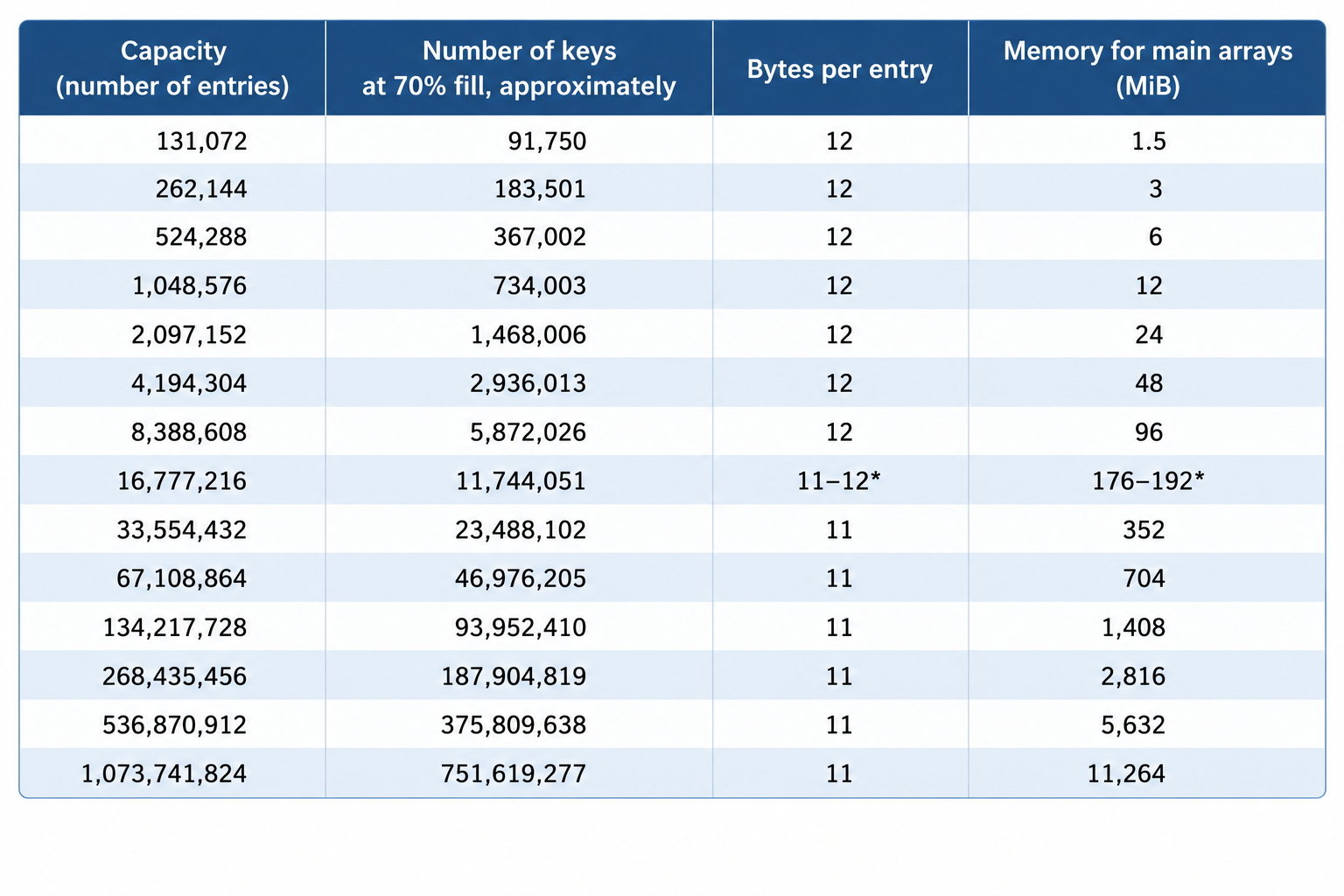
* In the current implementation, at the transitional capacity of 16,777,216 slots, the memory cost depends on how the index was created. When creating a table, you can specify the expected number of keys per region in advance. Creating an index at this capacity directly requires 11 bytes per slot, while reaching it through successive expansions requires 12.
Basic region overhead:
In addition to the index, each region uses working buffers and internal bookkeeping structures. Around 3 MB per region can be used as a rough estimate of basic overhead, but this is not a strictly constant amount: buffers can grow when processing large records, bulk operations, and so on.
Basic overhead is approximately 3.15 MB per region, or about 31.5 GB for 10,000 regions. This is a preliminary estimate; buffers can grow when processing large records and bulk operations.
Thus, a large number of small regions increases overhead even when the total number of keys remains unchanged.
Example: 100 billion records of 1 KB each (approximately 100 TB of raw data)
With a target logical data volume of 10 GB per region, this requires 10,000 regions, each containing 10 million keys. This is a calculation of logical data volume. On-disk headers, free space, obsolete versions, and replication must be accounted for separately.
For 10 million keys, the required nominal index capacity is 16,777,216 slots. At 12 bytes per slot, this is approximately 201.3 MB per region. For 10,000 regions loaded incrementally, with index expansion, we obtain:
Index 2013 GB + buffers 32 GB = 2.045 TB.
Keep in mind that this is not the cluster's complete RAM budget. Read Cache, connections, threads, collision-handling structures, and temporary allocations during index expansion require additional memory. If many regions expand at once, peak memory consumption can significantly exceed the baseline. Deleting a key from the index frees its slot, but does not shrink the index. If you load 100 billion keys and then delete them, the memory remains allocated, and you can load another 100 billion keys without additional allocations. So far, there has been no need to delete keys in bulk and release the memory, but we plan to implement this in the future, along with many other improvements.
In this article, we introduced the architecture of AtalantaDB and explained how its index design affects memory consumption and cluster planning. Future articles will cover operations in greater detail: recovery after failures, topology changes, and choosing settings for different workloads. If you would like to try AtalantaDB with your own data, start with Community Edition. Questions, feedback, and examples of your use cases are welcome. They will help us decide which topics to cover next.